Everything in the box

Every feature your restaurant actually runs on

This is the full list, grouped the way the software itself is organised — from the billing screen your cashier uses to the payroll run at the end of the month.

Point of sale and billing

The screen your counter staff live in. Built so a full order can be punched, printed and paid in seconds.

  • Touch-friendly POS with item images you can switch off on slower hardware
  • Dine-in, takeaway, delivery and QR orders on one menu and one bill sequence
  • Split bills, item-level and bill-level discounts, and service charges
  • Multiple payment modes on a single bill, including part payments
  • Hold and recall orders, and save an order as a draft mid-service
  • Refunds and cancellations with a reason trail
  • Due payments for account customers, and a received-payments report
  • Counter-level cash handling, so each till reconciles on its own

Menu and pricing

Build the menu once and reuse it across branches, QR ordering and delivery.

  • Menus, categories and items with photos, descriptions and codes
  • Item variations for size, portion or preparation
  • Modifier groups and modifiers, with required and optional rules
  • Per-branch pricing, so the same dish can cost differently by outlet
  • Mark items available or unavailable from the kitchen, live
  • Tax rate per item or category, inclusive or exclusive of the listed price

Kitchen operations

Tickets reach the section that cooks them, and nothing gets lost between counter and pass.

  • Kitchen order tickets printed per section, not one ticket for everything
  • Kitchen places, so hot, cold, grill and bar each get their own screen and printer
  • Live KOT screens per section, plus an all-tickets view
  • Removed-KOT-item report, so voids after firing are visible
  • Waiter request handling from the floor
  • Item availability toggled by kitchen staff and reflected instantly on the POS

Floor and table service

Map the room the way it is actually laid out, and see its state at a glance.

  • Tables grouped into areas — terrace, AC hall, family section, whatever you use
  • Table status through the service, from seated to billed
  • Reservations with date, time and party size
  • Table-wise order counts and revenue in the analytics report
  • Move or merge orders between tables

QR ordering and customers

Let guests order from their own phone, and keep a record of who is buying.

  • QR code menus that open in any phone browser, with no app to install
  • QR codes generated per table, or one for the whole outlet
  • Guest orders arrive directly in the POS queue
  • Customer records with contact details and order history
  • Delivery executives assigned to orders, with their own report
  • Delivery-app order tracking alongside your own channels

Inventory and purchasing

Track what you bought, what you used and what it cost — down to the recipe.

  • Inventory items with categories and units of measure
  • Stock levels per branch, with movement history
  • Recipes linking menu items to ingredients, so sales draw down stock
  • Batch recipes and batch inventory for prep made ahead
  • Purchase orders and supplier records
  • Inventory and batch reports for consumption and valuation

Staff, attendance and payroll

Every action traceable to a person, and the wage run built from the same data.

  • Staff accounts with role-based permissions
  • Shifts and rosters
  • Attendance marking, with an attendance report
  • Leave management and leave categories
  • Salary components and salary structures per staff member
  • Payroll runs with PDF payslips
  • Staff profiles holding joining and relieving dates

Cash register and expenses

Close the day with the drawer counted and the outgoings recorded.

  • Cashier sessions with opening and closing balances
  • Denomination-wise cash counting at close
  • Approval flow for register adjustments
  • Cash register reports per session and per cashier
  • Expenses with categories, and an expense report

Reports and analytics

Twenty-odd reports, all filterable by date range and branch.

  • Daily and summary sales reports
  • Item-wise and category-wise performance
  • Tax report and a dedicated GST report for filing
  • Restaurant analytics: table-wise counts, busiest table, best-selling items
  • Refund, cancelled-order and removed-KOT-item reports
  • Delivery app and delivery executive reports
  • Due payments and due-payments-received reports
  • Print job log, so you can prove what was sent to which printer and when
  • Expense and payroll reporting

Multi-branch and platform

One account, however many outlets — plus the plumbing that keeps it running.

  • Unlimited branches under one login, each with its own menu, staff and printers
  • Multiple counters per branch, each with its own printer and cash register
  • Role and permission management per restaurant
  • Multi-language interface and menus
  • Light and dark themes
  • Payment gateway integration including Razorpay and Stripe
  • Desktop print agent for instant thermal printing, pushed in real time
  • Cloud-hosted, so owners can read live figures from any device

What it looks like in service

Screens and counters from outlets running MealNix today.
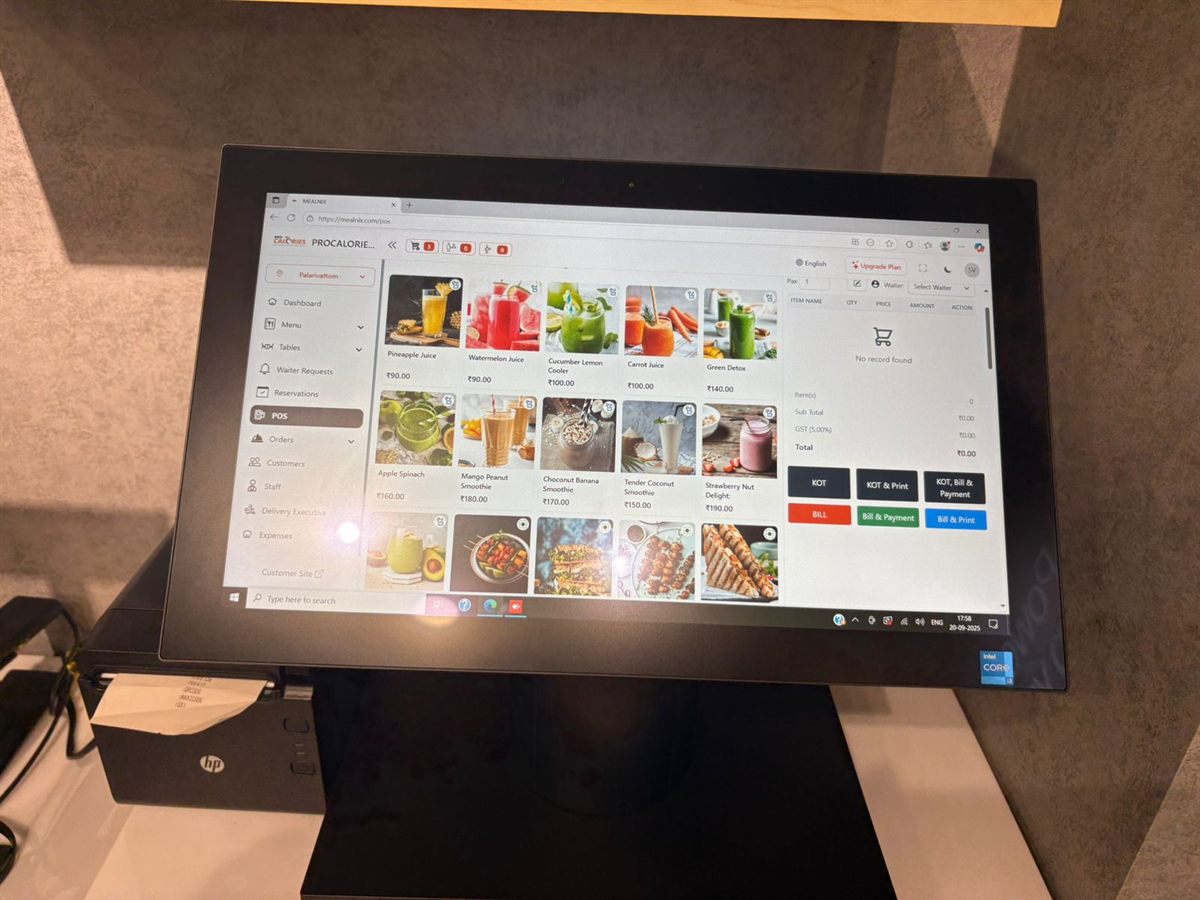
MealNix POS menu grid with item photos, prices and KOT and bill actions
The billing screen
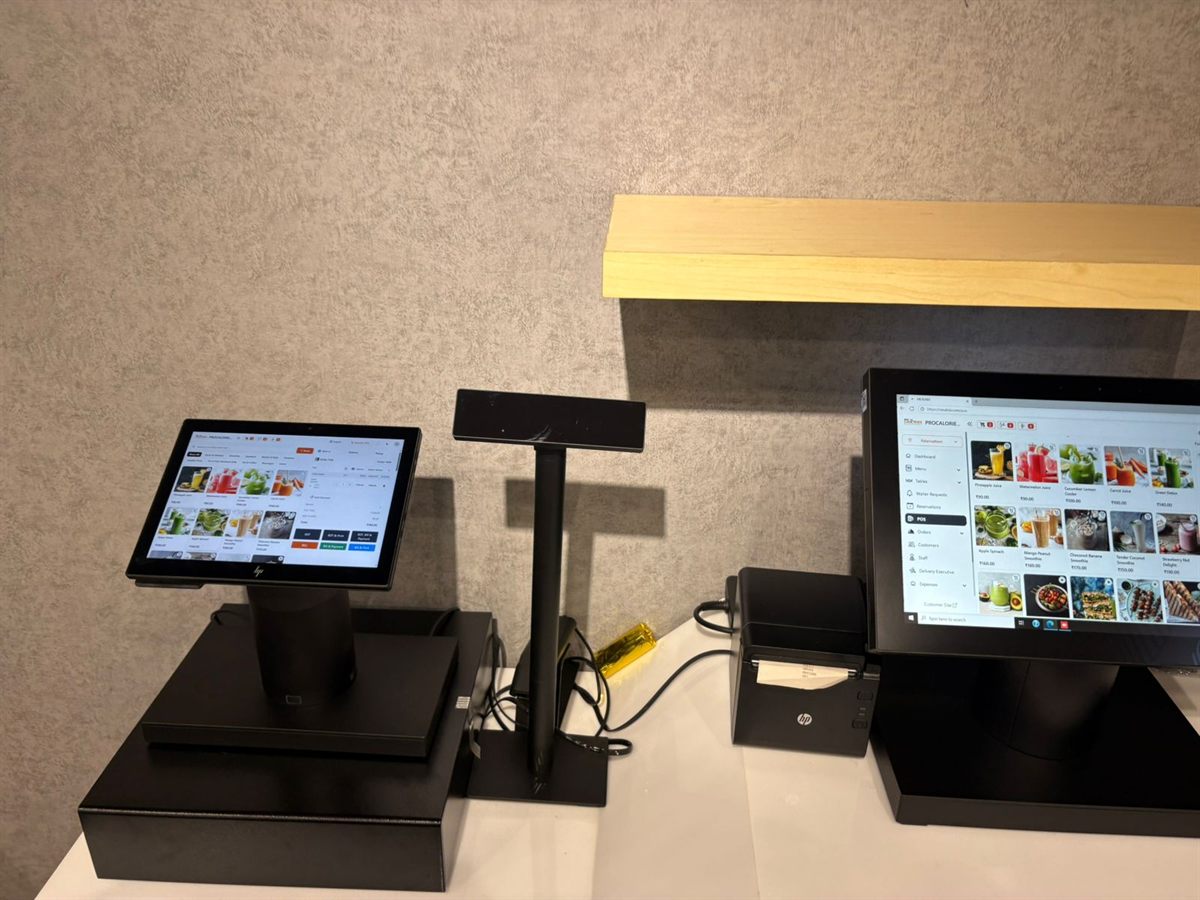
Counter with customer display, pole display, thermal printer and POS terminal
A full counter setup
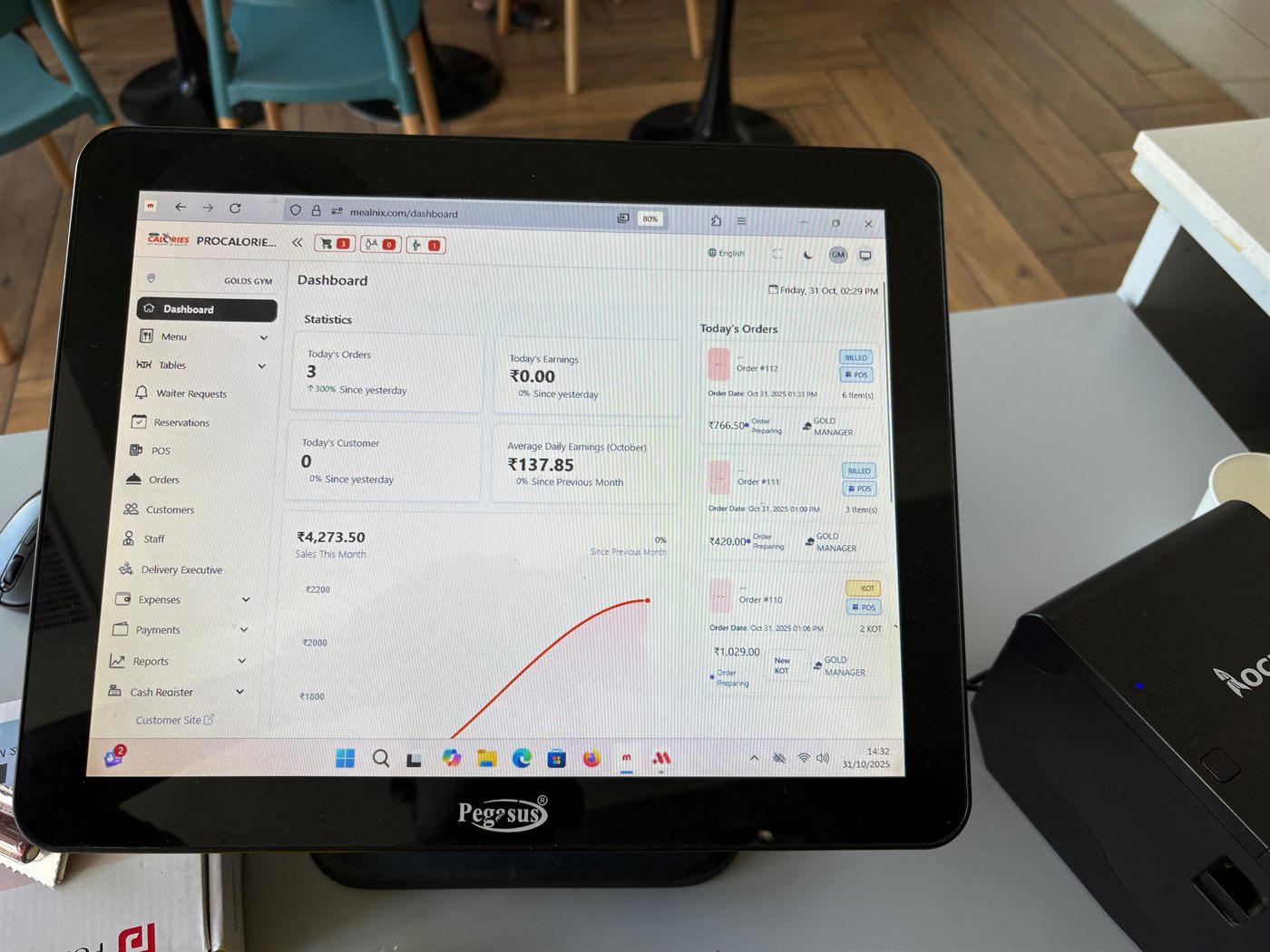
MealNix dashboard showing today's orders, earnings, sales chart and live order list
The owner's dashboard

See the full gallery

Questions about the features

What operators ask when they are working out whether this covers their setup.

Are all these features included in every plan?

The core point of sale, menu, table, KOT, reporting and staff features come with a restaurant account. Inventory, Cash Register and Kitchen are separate modules that can be enabled for your account. Check the pricing page for what each plan includes, or ask us and we will confirm against your requirement.

Do I need special hardware?

No. MealNix runs in a web browser, so any reasonably modern POS terminal, laptop or tablet works. For printing you need a standard 58mm or 80mm ESC/POS thermal printer, connected by USB or network. Cash drawers that trigger from the printer work as normal.

How does printing work if the browser blocks it?

A small desktop print agent runs on the billing machine and receives print jobs in real time, so bills and kitchen tickets print without a browser dialog. Every job is logged, and the print job report shows what was sent, to which counter, and whether it completed.

Can different staff see different things?

Yes. Permissions are role-based, so a cashier, a kitchen user, a manager and the owner each see only what they should. Actions are recorded against the logged-in user.

Does inventory really link to the menu?

Yes, through recipes. You define which ingredients and quantities make up a menu item, and selling that item draws the ingredients down from stock. Batch recipes cover prep made in advance, so a sauce produced on Monday is consumed correctly all week.

Can I try it before paying?

Yes. Start a free trial, set up your real menu and run a few test bills. Nothing is charged until you choose a plan, and we can help import your existing menu and staff so the trial reflects your actual operation.

See it against your own menu

Start a free trial and load your real items, or let us walk you through the parts that matter to your operation.

Start Free Trial View Pricing